
Download Pistonsoft MP3 Recorder Pro – Audio Recorder, MP3 Recorder, Record Audio, Voice Recorder, Music Recorder, Audio Capture, Sound Recording, Recording Software, Audio Tool, Audio Utility
Overview
Pistonsoft MP3 Recorder Pro is a dedicated audio capture solution tailored for users seeking high-quality recordings from multiple sources on their Windows PC. Designed for both casual users and audio enthusiasts, the application enables the recording of audio from media players, microphones, and streaming services, making it a versatile utility for capturing digital and analog sound. Its primary function lies in audio digitization, particularly for preserving vintage formats such as vinyl records and cassette tapes, bridging the gap between analog nostalgia and modern digital accessibility.
The app addresses the common challenge of preserving audio content that exists in outdated formats by offering a streamlined, efficient process for conversion. Target users include content creators, archivists, musicians, and individuals looking to transfer old recordings to digital libraries. While the developer, Pistonsoft, is known for audio-focused tools, specific company background details were not provided.
The application plays a significant role in the audio utility ecosystem by offering a reliable, feature-rich alternative to more complex digital audio workstations. Its ability to capture audio in real time from various inputs ensures it remains relevant for users who need a straightforward yet powerful recording experience without the overhead of professional-grade software.
Key Features & Functionality
- Multi-Source Recording: The app supports recording from diverse audio sources, including media players, streaming platforms, and external input devices like microphones. This allows users to capture live audio feeds, online music, podcasts, or voiceovers without relying on system audio routing limitations.
- Multiple Format Support: Recordings can be saved in WMA, WAV, and OGG formats, offering flexibility based on file size, compatibility, and quality preferences. This enables users to balance storage efficiency with audio fidelity depending on their intended use.
- Customizable Interface: The user interface is fully customizable, allowing users to adjust layout, color schemes, and tool visibility. This adaptability ensures a personalized experience that suits both novice users and advanced operators.
- Noise Filters: Intelligent noise suppression activates during active sound and deactivates during silence, reducing background noise and enhancing the clarity of recorded audio. This feature is particularly useful for voice recordings or low-quality source material.
- Digitization Capabilities: Specifically designed for converting analog audio, the app facilitates the transfer of vinyl records and cassette tapes into digital formats. This makes it an essential tool for audio preservation and digital archiving.
For example, a user can connect a turntable to their PC and use the app to record a vinyl album in WAV format for archival purposes. Similarly, a podcast host might use the software to capture live audio from a streaming service for later editing. The combination of multi-source support and format flexibility ensures broad applicability across personal, creative, and archival workflows.
Interface, UX & Performance
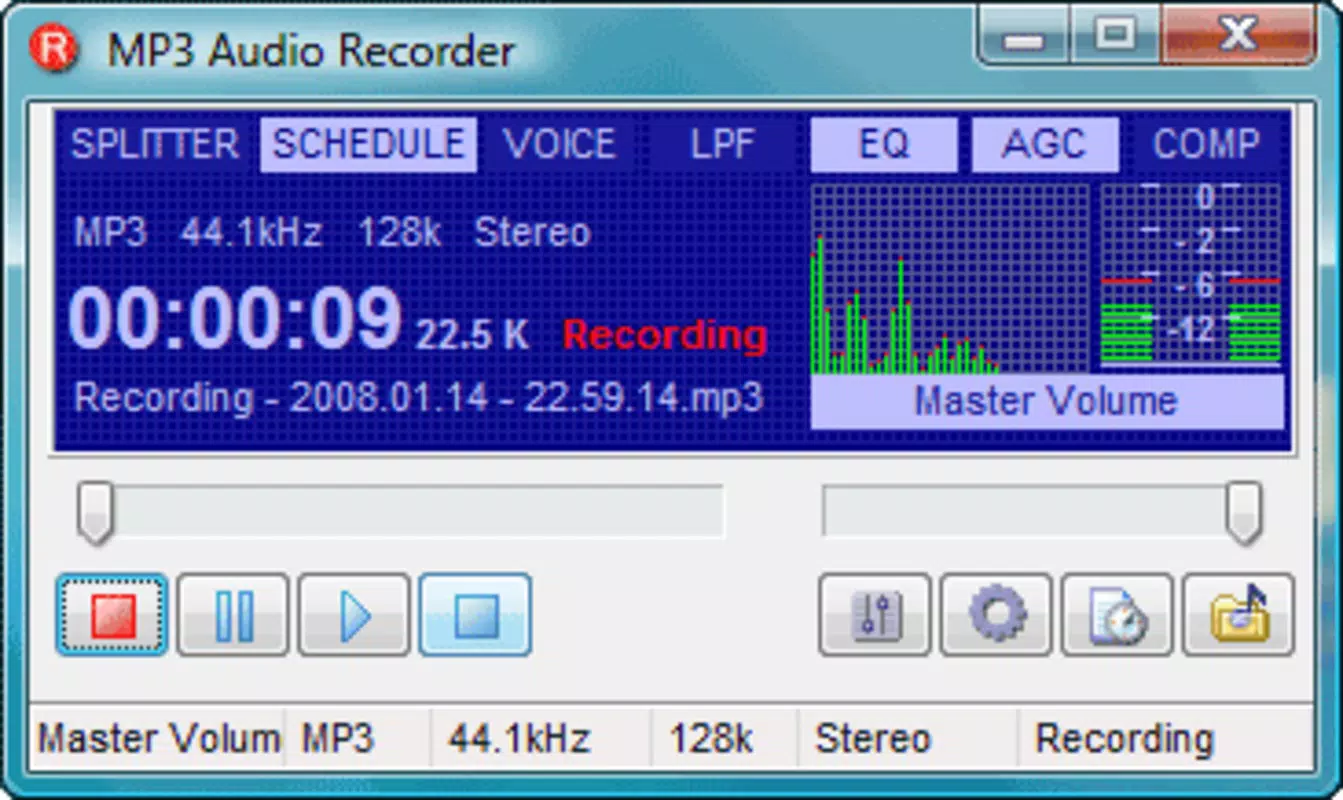
The interface of Pistonsoft MP3 Recorder Pro is structured around simplicity and functionality, featuring a clean layout with clearly labeled controls for recording, playback, and format selection. Navigation is intuitive, with primary functions accessible through a central toolbar and dropdown menus. The customizable nature of the interface allows users to tailor the workspace to their preferred workflow, reducing clutter and improving efficiency.
While the developer did not list formal performance metrics, the application’s file size of 5.2 MB suggests a lightweight footprint, which typically correlates with efficient resource usage. This implies stable operation even on older or low-spec Windows systems. Responsiveness is expected to be consistent during recording sessions, with minimal lag between input detection and audio capture.
Stability across different device categories—such as desktops, laptops, and all-in-one systems—was not explicitly detailed, but the app’s long-standing presence since 2013 indicates proven reliability. Although the developer did not specify minimum OS requirements, its compatibility with modern Windows versions is likely given its continued availability. Overall, the user experience appears optimized for consistent, uninterrupted recording without excessive system strain.
Platform Compatibility & Technical Requirements
Pistonsoft MP3 Recorder Pro is designed exclusively for the Windows platform. The current version is 2.4.4, with a file size of 5.2 MB, indicating a compact and lightweight installation. Specific operating system requirements were not listed by the developer, so compatibility with newer or older Windows versions remains unspecified.
Users should exercise caution when installing on systems beyond the officially supported range. The app does not appear to be available on mobile platforms such as Android or iOS, limiting its use to desktop and laptop environments. As no additional technical specifications were provided—such as RAM, CPU, or disk space requirements—users are advised to test the software in their intended environment.
The absence of detailed system information suggests the application is built for broad compatibility, but verification on individual machines is recommended. Despite the lack of explicit data, the app’s long-standing presence in the market indicates ongoing functionality across a wide range of Windows systems.
Pros and Cons
Pros
- Supports recording from multiple audio sources, including streaming services and external devices.
- Offers flexibility with multiple audio formats: WMA, WAV, and OGG.
- Customizable interface enhances user control and workflow efficiency.
- Includes intelligent noise filtering for improved audio clarity.
- Designed specifically for digitizing analog audio like vinyl and cassette tapes.
Cons
- Platform is limited to Windows; no support for Android or iOS devices.
- Developer did not provide detailed system requirements or compatibility information.
- Price point of $29.95 may be considered high for casual users.
- No cloud sync or automatic backup features were mentioned.
- Version 2.4.4 has not been updated since 2013, raising concerns about modern OS support.
FAQ
Is Pistonsoft MP3 Recorder Pro safe to download and install?
The app is distributed through official channels by the developer, Pistonsoft. As with any third-party software, users should ensure they download from trusted sources to avoid malware or bundled programs.
Can I use this app to record audio from streaming services?
Yes, the app supports recording from media players and streaming platforms, allowing users to capture online audio content such as music, podcasts, or live streams.
Is the software compatible with Windows 10 and Windows 11?
While the developer did not specify compatibility details, the app’s long history suggests it may function on modern Windows versions, though performance is not guaranteed on all systems.
Does the app support automatic file naming or batch processing?
Specific automation features like batch processing or automatic naming were not mentioned in the provided documentation.
How do I update the software if a newer version is released?
Updates are not currently available for the current version (2.4.4), and the developer has not indicated future release plans. Users should monitor the official website for any announcements.
Final Thoughts
Pistonsoft MP3 Recorder Pro stands as a focused, powerful audio capture tool for Windows users with specific needs in recording, digitization, and audio preservation. Its ability to record from diverse sources and support multiple formats makes it a valuable asset for archivists, musicians, and hobbyists. While the lack of recent updates and limited platform availability are notable drawbacks, the app’s core functionality remains robust.
For users who need a reliable, no-frills solution for capturing audio from media players, microphones, or vintage formats, this software delivers tangible value. Its customizable interface and built-in noise filters further enhance usability and output quality. Despite its age, the app continues to serve a niche but important role in the audio utility space.
If you're looking to digitize old vinyl or cassette tapes, or simply record high-quality audio from your PC, this tool offers a straightforward path to success. Download Pistonsoft MP3 Recorder Pro now.


